Bambu Lab AMS: What It Does and Which One You Need
The Bambu Lab AMS feeds multiple spools into one printer. Here is how the AMS lite, AMS, AMS 2 Pro and AMS HT differ, and which printers take which.
By Sepehr Sabbagh-pour · Published · 5 min read
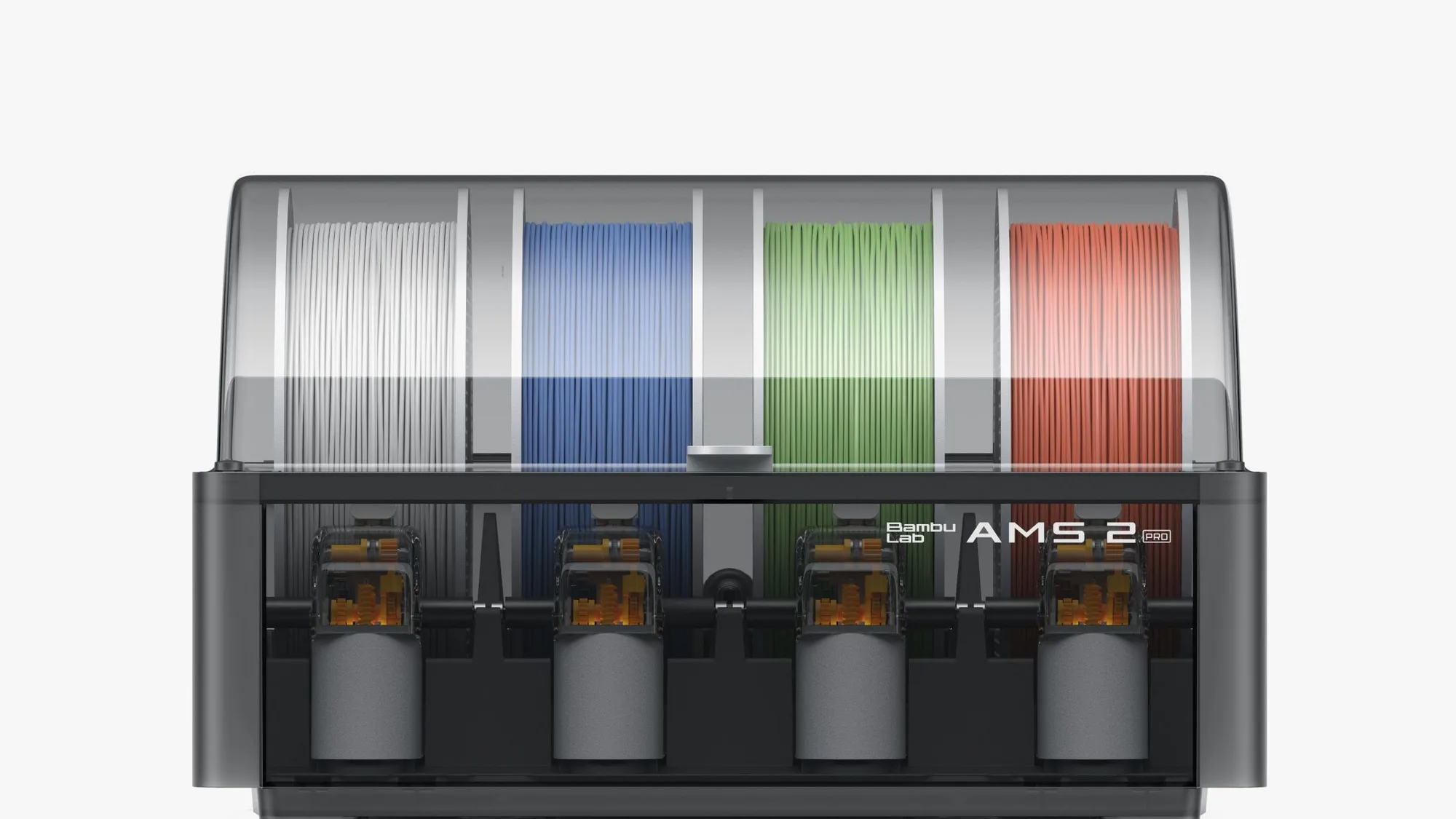
The Bambu Lab AMS (Automatic Material System) is a spool holder that feeds filament into a Bambu Lab printer automatically, so one print can use several colors or materials without you swapping spools. Bambu sells four versions: the original AMS, the AMS lite, the AMS 2 Pro and the AMS HT.
What does the Bambu Lab AMS do?
An AMS stores spools next to the printer, reads each spool's RFID tag, and loads and unloads filament on demand. That lets a slicer assign different colors or materials to different parts of a model, and lets the printer switch to a backup spool of the same filament when one runs out. Bambu describes the AMS lite as supporting automatic filament backup, RFID sync and snap-away or dissolvable support material, and the same ideas carry across the family. For how multicolor printing works in general, including the waste it produces, read multicolor 3D printing explained.
Bambu's wiki says the AMS, AMS 2 Pro and AMS HT all use a two-stage feeding system. A feeder unit inside the AMS pushes filament to an assist motor, which continues feeding it to the toolhead. Because the toolhead extruder and the assist motor rarely run at exactly the same speed, a filament buffer must sit between the printer and every one of these units. The AMS lite is different: it uses one stage, feeds the toolhead directly and needs no buffer.
Which Bambu Lab AMS models exist?
Bambu's connection guide lists four: the AMS (first generation), the AMS 2 Pro (second generation), the AMS HT, and the AMS lite designed for the A1 series. The table below uses figures from Bambu's store pages and wiki; prices are left out because Bambu's store redirects by country and they change often.
| Model | Feeding | Drying | Works with |
|---|---|---|---|
| AMS lite | Single stage, four spool holders, no buffer | None | A1 and A2 series only, one unit per printer |
| AMS (first generation) | Two stage with assist motor | Bambu says it does not support AMS drying (H2S notes) | Printers that take an AMS, with a buffer or hub |
| AMS 2 Pro | Two stage, four slots | Up to 65 °C, spools rotate, RFID picks settings | Bambu says all Bambu Lab printers |
| AMS HT | Two stage, one spool, bypass outlet for soft materials | Up to 85 °C, 150 W average | Bambu says all Bambu Lab printers |
Spool size matters too. Bambu lists AMS lite spools at 40 to 68 mm wide with a 53 to 58 mm inner diameter, and AMS 2 Pro and AMS HT spools at 50 to 68 mm wide, all for 1.75 mm filament.
What is the difference between AMS lite and AMS 2 Pro?
The AMS lite is the cheaper, simpler unit built for the A1 series, with no assist motor, no buffer and no drying. The AMS 2 Pro is the second-generation unit with an assist motor, sealed storage and a heated, rotating drying mode up to 65 °C. Bambu's A1 guide also says the A1 series came with AMS lite originally and only needs an AMS Hub to run the newer units.
Filament support differs as well. Bambu's AMS lite page lists TPE and TPU among unsupported filaments, along with wet PVA and BVOH and anything containing carbon or glass fiber except Bambu PLA-CF. The AMS 2 Pro page lists PLA, PETG, ABS, ASA, PET, PA, PC, PP, POM, HIPS and several Bambu composites, and says TPE, generic TPU and carbon or glass fiber filaments are not supported, with Bambu's own TPU for AMS as the exception.
What is the AMS HT for?
The AMS HT is a single-spool unit built to dry and feed high-temperature or high-performance filaments, with drying up to 85 °C. Bambu's page says each AMS HT needs an external 220 V power supply for drying, supplied in the box, because the printer cannot power it. It also has a bypass outlet, an independent path for soft or brittle materials, and Bambu notes the AMS HT cannot run filament drying while feeding a print through that bypass port.
Bambu's AMS 2 Pro page states that filaments marked as needing a higher drying temperature, including ABS, ASA, PA and PC, cannot be dried completely in an AMS 2 Pro, and recommends an AMS HT for them. For drying in general, see how to dry filament and how to choose a filament dryer.
How many AMS units can each printer take?
Limits come from Bambu's multi-AMS compatibility guide:
- A1 series: one AMS lite, or up to four units of AMS, AMS 2 Pro and AMS HT in any mix. The newer units need Bambu's A1 AMS Hub and firmware 01.07.00.00 or later, and AMS lite cannot be combined with them.
- X1 and P1 series: up to four AMS units in total. One unit needs a filament buffer; two or more need an AMS Hub.
- P2S: up to four AMS 2 Pro and four AMS HT at once, eight units with 20 slots. The P2S Combo includes the buffer.
- H2 series: up to four AMS 2 Pro and eight AMS HT. The H2S is single nozzle, so it reaches 24 colors; the dual-nozzle H2D and H2C reach 25 with an external spool. The buffer is built in.
Printer pages on this site cover each model: Bambu Lab A1, P2S and H2D. The A1 versus P1S comparison shows how AMS support differs between them.
Which AMS do you need?
Pick by printer and by filament. On an A1 or A1 mini, the AMS lite is the unit the printer was designed around, and you move to an AMS 2 Pro or AMS HT only by adding the AMS Hub. On a P1, X1, P2S or H2 printer, the AMS 2 Pro suits PLA and PETG with built-in drying, and the AMS HT suits materials that need hotter drying. Mixing is allowed on those printers within the unit limits above.
Powering the dryer is a separate cost. Bambu says an H2, P2 or X2D printer can power one AMS 2 Pro for drying, while A1, P1 and X1 printers need a Switching Adapter for each AMS 2 Pro. Bambu also says the AMS 2 Pro cannot dry on its own without a 6-pin cable to a powered-on printer. Using Bambu filament helps, since RFID tags set the profile automatically; third-party spools must be set by hand, as covered in the Bambu Lab filament guide. If filament snaps or stops feeding, see how to fix an AMS filament jam. To plan a first purchase, the beginner printer guide is a good start.
Where this comes from. Every figure is taken from Bambu Lab's own wiki and store pages, listed in Sources. This page is desk research: nobody here has used an AMS.
Frequently asked questions
What is the Bambu Lab AMS?
The Bambu Lab AMS, short for Automatic Material System, is a filament feeder and spool holder that connects to a Bambu Lab printer. It identifies Bambu spools by RFID, loads and unloads filament automatically, and lets one print use several colors or materials. Bambu sells the original AMS, the AMS lite for the A1 series, the AMS 2 Pro with built-in drying up to 65 degrees Celsius, and the single-spool AMS HT with drying up to 85 degrees Celsius. Which one you can use depends on your printer model.
What is the difference between AMS lite and AMS 2 Pro?
The AMS lite uses a single-stage feed straight into the toolhead, so it needs no buffer, but it has no drying and Bambu lists TPE and TPU as unsupported. The AMS 2 Pro uses a two-stage feed with an assist motor, needs a filament buffer, seals the spools and can dry them at up to 65 degrees Celsius while rotating them. The AMS lite works only with A1 and A2 series printers, one unit at a time, while Bambu says the AMS 2 Pro works with all its printers.
Can you mix AMS lite with other AMS units?
No. Bambu's A1 connection guide says the A1 series AMS Hub supports any combination of AMS, AMS 2 Pro and AMS HT, up to four units, but does not support mixed use of AMS lite with any of them. To switch types you should first disconnect the existing unit, then change the AMS type in the printer settings or Bambu Studio. Connecting a unit before switching the type can cause communication loss and errors, so the cable may need to be reconnected.
How many AMS units can one Bambu printer use?
It depends on the printer. Bambu's guide says the A1 series takes one AMS lite or up to four AMS, AMS 2 Pro and AMS HT units, and the X1 and P1 series take up to four units in total. The P2S supports up to four AMS 2 Pro and four AMS HT, eight units with 20 slots. The H2 series supports up to four AMS 2 Pro and eight AMS HT, which gives the single-nozzle H2S up to 24 colors.
Does the AMS dry filament?
Only the AMS 2 Pro and AMS HT dry filament. Bambu lists up to 65 degrees Celsius for the AMS 2 Pro and up to 85 degrees Celsius for the AMS HT, with spools that rotate during drying. Bambu says materials marked as needing a higher temperature, such as ABS, ASA, PA and PC, cannot be dried completely in an AMS 2 Pro, and recommends the AMS HT. Neither unit can dry on its own: each must be connected to a powered-on printer by a 6-pin cable.
Sources

Founder and editor
Software engineer since 2009 and Head of Engineering by day, a maker who has owned several 3D printers, writing practical guides to 3D printers, filament and running costs, with every article saying what was and was not tested.
Drafted with AI assistance, then edited and reviewed by Sepehr before it goes live. How we use AI.
Keep reading
 AI illustration
Bambu AMS Jam: How to Fix a Filament Jam
A Bambu AMS jam usually traces to the spool, a tangle, worn PTFE tubing or broken filament in the hub. Here is the order Bambu…
Bambu Lab H2D: Who Needs Dual Nozzles and a Laser Option?
The Bambu Lab H2D is a dual-nozzle, enclosed CoreXY printer with optional laser and cutting kits. Specs, launch prices, reviewer…
Bambu Lab Filament Guide: Types, RFID and Alternatives
What Bambu Lab sells, what its wiki says about temperatures, nozzles and the AMS, how RFID spools work, and what to check before…