Heat Creep 3D Printer Jams: Causes and Fixes
What heat creep is, how to tell it from an ordinary clog, and the cooling, enclosure and settings fixes Prusa's documentation recommends.
By Sepehr Sabbagh-pour · Published 11 October 2026 · 6 min read
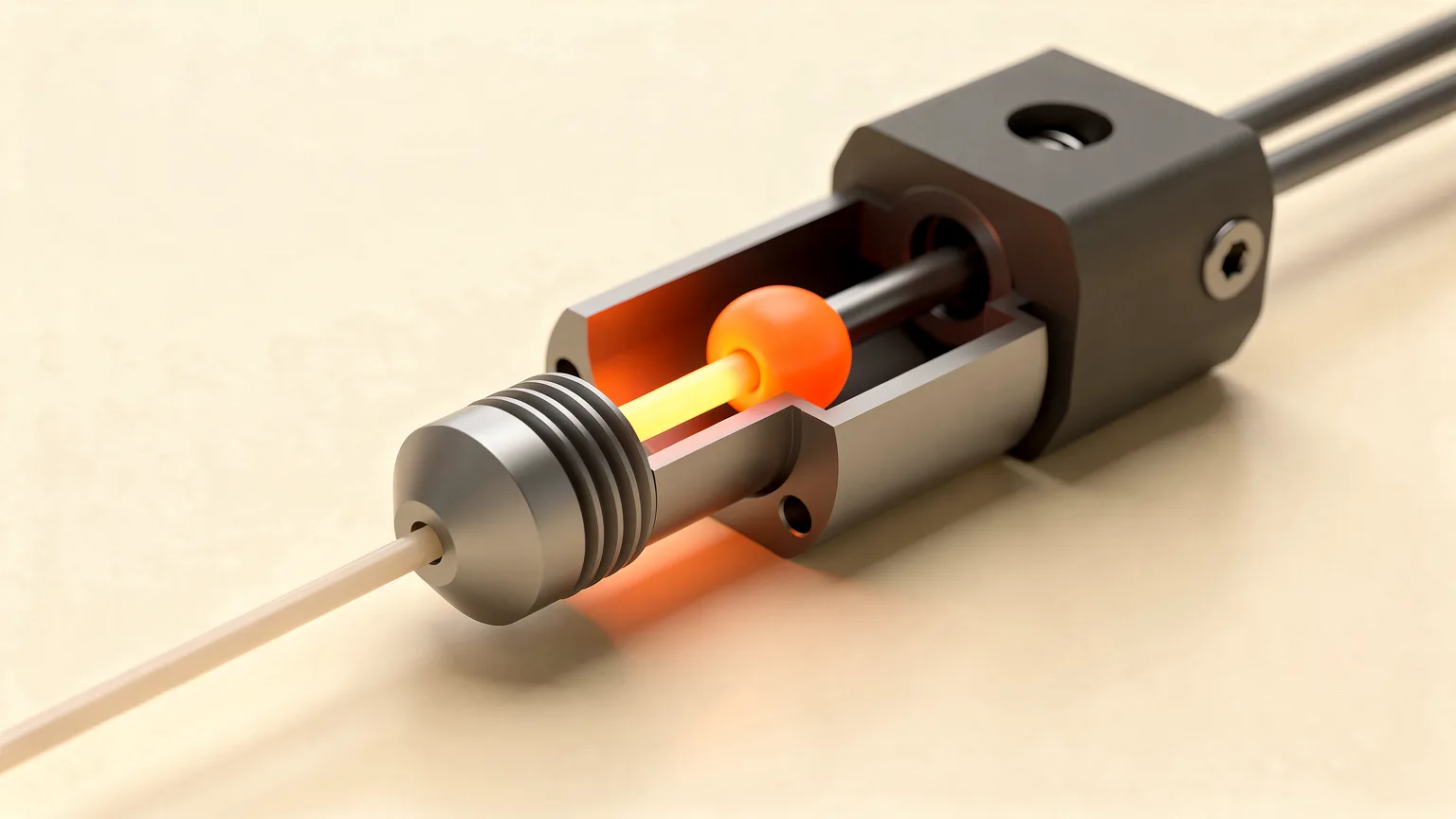
A heat creep 3D printer jam happens when heat climbs above the heater block, softens the filament too high in the hotend and blocks it. Extrusion stops while the print head keeps moving, with no error. Fixing it means clearing the clog and then cooling the top of the hotend better.
Research-based guide. The causes and fixes below follow Prusa's Knowledge Base, which was written for its MK2.5, MK3 and related printers. Other makers' hotends differ. Nozzle Notes has not tested these methods.
What does heat creep look like in a 3D printer?
Prusa describes two symptoms. The printer stops extruding but the print head keeps moving, and no error is reported. The extruder motor may also grind into the filament, sometimes with a clicking or ticking sound.
Those signs also fit an ordinary clog or a worn feed gear. Prusa says heat creep is only one of several ways a hotend clogs and is "not the most probable explanation" in most cases. Rule out the other causes first. These guides cover them: fix extruder clicking, fix under-extrusion and fix a print that stops midway.
What causes heat creep?
Filament should only melt just above the nozzle. The heatbreak is the narrow section that keeps heat from travelling upward, and the heatsink with its fan carries away what does get through. Prusa lists these causes of the upper hotend overheating:
- High ambient temperature or an enclosure. Prusa gives about 35 °C (30 °C for some filaments) as the level to watch, and says a fully closed, unventilated enclosure is especially likely to cause trouble.
- Low-melting filament. PLA is most at risk because it has the lowest melting temperature of the common filaments.
- Metal-particle filaments, which conduct heat up the hotend.
- A hotend temperature set too high.
- Poor thermal transfer between the nozzle, heatbreak and heatsink.
- Too little heatsink airflow.
- Too little or too slow filament flow. The filament itself absorbs heat, so slow extrusion lets heat travel upward.
Prusa's clogged-nozzle guide for newer printers adds the same picture: heat travels up the hotend and melts the filament before it reaches the melt zone, most likely with PLA in a closed enclosure or a very warm room. For why PLA is sensitive to temperature, see PLA print temperature.
How do you fix a heat creep clog?
Treat it as a clogged hotend. Prusa's instruction is to follow its guide for clearing a clog in the hotend or nozzle, which covers a hot push with new filament, a cold pull and, if needed, replacing the nozzle. Our summary is in how to clean a 3D printer nozzle and fix a clog. Heat the nozzle only through the printer's menu, wear gloves and do not touch the hot nozzle. Follow your own maker's procedure.
Clearing the clog only helps for a while if the cause is still there, so work through the checks in the next section.
How do you stop heat creep coming back?
Prusa's prevention advice, grouped by area:
| Area | What Prusa suggests |
|---|---|
| After each print | Unload the filament while the hotend is still hot, using the printer's Unload function. |
| Hotend assembly | On an assembled E3D v6.1 hotend, leave about 0.5 mm (0.02 inch) between the heater block and the nozzle's hex head. Seat the PTFE tube flush with the heatbreak edge. Use thermal paste on the heatbreak thread that meets the heatsink, especially after taking the hotend apart. |
| Cooling | Fit the hotend fan so its sticker side faces outward and it pushes air inward. Blow dust out of the heatsink and fan with canned air. On Prusa's MK3 family the nozzle fan should read between 4000 and 4400 RPM during a print. |
| Extruder | Keep the idler tension neither too loose nor too tight, and keep the gears clean. |
| Slicer settings | Lower the bed temperature by 5 or 10 degrees, try a layer height of 0.15 or 0.20 mm if fine detail is not needed, and raise speed by about 10 percent without going over 200 mm/s for infill at 0.20 mm layers and below. |
If lowering the bed temperature causes warping or adhesion problems, Prusa suggests using a brim in PrusaSlicer. Layer height and speed matter because thin layers at low speed move little filament, so it sits in the hotend longer and absorbs more heat. These figures are for Prusa's printers, so treat them as a starting point elsewhere.
Does printing in an enclosure cause heat creep?
It can. Prusa lists an enclosure as a cause, and says a fully closed, unventilated enclosure is especially likely to cause problems, mainly with PLA. Its clogged-nozzle guide for newer printers advises opening the enclosure doors or top cover vents when printing PLA. Printing PLA with the enclosure open is a simple first step. For the wider trade-offs of enclosures, see enclosed vs open-frame 3D printers.
Is it heat creep or something else?
Because the symptoms overlap, check the cheaper explanations first. Prusa's guides name these other causes of a stalled or noisy extruder:
- Damaged nozzle or impurities in the filament.
- Debris in the feed gear grooves.
- Wet or degraded filament that swells or bubbles. See how to dry filament.
- A first layer set too close, which Prusa says can eventually clog the hotend.
- A standard profile used on a High Flow nozzle, or the reverse.
- Overtight idler screws or a dirty drive gear.
If none of those apply and the printer is warm, in an enclosure, or has a weak or backward hotend fan, heat creep becomes more likely. Hotend design also affects how well heat is kept out of the upper section, as covered in hotends and nozzle materials. For routine checks such as cleaning fans, see the 3D printer maintenance checklist.
Quick checklist
- Clear the clog using your maker's procedure.
- Check that the hotend fan spins, faces the right way and is free of dust.
- Open the enclosure or lid if printing PLA, and cool a hot room.
- Confirm the hotend temperature is not higher than the filament needs.
- Check the nozzle gap, PTFE tube seating and thermal paste if the hotend has been rebuilt.
- Unload filament while the hotend is hot at the end of a print.
Frequently asked questions
What is heat creep in a 3D printer?
Heat creep is when the parts of the hotend above the heater block get too hot. Filament should melt only just above the nozzle, but if the heatbreak gets too hot, heat spreads upward and softens the filament higher in the hotend, where it forms a clog. Prusa describes the typical symptom as the printer no longer extruding while the print head keeps moving and no error appears. The extruder motor may also grind into the filament and click. Prusa notes it is only one of several clog causes and usually not the most likely one, so check the other causes first.
What causes heat creep?
Prusa lists a high ambient temperature (above about 35 °C, or 30 °C for some filaments), printing in an enclosure, metal-particle filaments, a hotend temperature set too high, poor thermal transfer between the nozzle, heatbreak and heatsink, too little heatsink airflow, and too little or too slow filament flow. PLA is the most affected common filament because it has the lowest melting temperature. A fully closed, unventilated enclosure is especially likely to cause problems. Often several of these combine, for example PLA printed slowly in a warm closed enclosure with a dusty hotend fan, so fixing only one factor may not be enough.
How do you fix heat creep?
Treat it as a clogged hotend first: heat the nozzle through the printer menu, wear gloves and follow your maker's clog procedure, such as a hot push, cold pull or nozzle replacement. Then remove the cause. Prusa suggests checking that the hotend fan faces the right way and is free of dust, opening enclosure vents when printing PLA, lowering the bed temperature by 5 or 10 degrees, trying 0.15 or 0.20 mm layers, raising speed by about 10 percent, and unloading filament while the hotend is still hot after a print. On a rebuilt E3D v6.1 hotend, check the roughly 0.5 mm nozzle gap, the PTFE tube seating and the thermal paste.
Can an enclosure cause heat creep?
Yes. Prusa lists printing inside an enclosure as a cause of heat creep and says a fully closed, unventilated enclosure is especially likely to cause problems, mostly with PLA, which has the lowest melting temperature of the common filaments. Its clogged-nozzle guide for newer printers advises opening the enclosure doors or top cover vents when printing PLA. Heat trapped in the chamber warms the heatsink, so the fan has less ability to keep the upper hotend cool. Opening a vent is free and reversible, which makes it the sensible first test. If your printer is enclosed, try printing PLA with the door or lid open before changing any hardware.
Is heat creep the same as a clogged nozzle?
Not exactly. A clogged nozzle is the result: material blocks the hotend. Heat creep is one possible cause, where filament softens too high up because the upper hotend is too hot. Other causes include a damaged nozzle, impurities in the filament, wet or degraded filament, debris in the feed gear, a first layer set too close, or the wrong profile for a High Flow nozzle. Prusa says heat creep is usually not the most probable explanation, so it recommends checking its under-extrusion, clogged hotend and cold pull guides first. Clearing the clog fixes the jam, but only fixing the cause stops it returning.
Sources

Founder and editor
Software engineer since 2009 and Head of Engineering by day, a maker who has owned several 3D printers, writing practical guides to 3D printers, filament and running costs, with every article saying what was and was not tested.
Keep reading
3D Print Missing Details? Why Slicers Drop Small Features
A 3D print missing details usually means the slicer dropped features thinner than one extrusion line. Wall settings, a smaller nozzle or a thicker model bring them back.
11 October 2026 · 5 min read
Supports Stuck to Print? How to Fix and Prevent It
Supports that will not come off are a slicer settings problem. Open the Z distance, thin the interface and pick an easier pattern, in that order.
11 October 2026 · 5 min read
Thermal Runaway Error: What It Means and How to Fix It
A thermal runaway error is a safety stop: the heater did not heat or hold temperature as expected. Here is what triggers it and what to check, in order.
11 October 2026 · 5 min read