3D Printer Stringing: Causes and How to Fix It
Stringing is rarely one problem. Work through the causes in this order: moisture, temperature, retraction, then travel moves and the nozzle, testing after each change.
By Sepehr Sabbagh-pour · Published · Updated · 6 min read
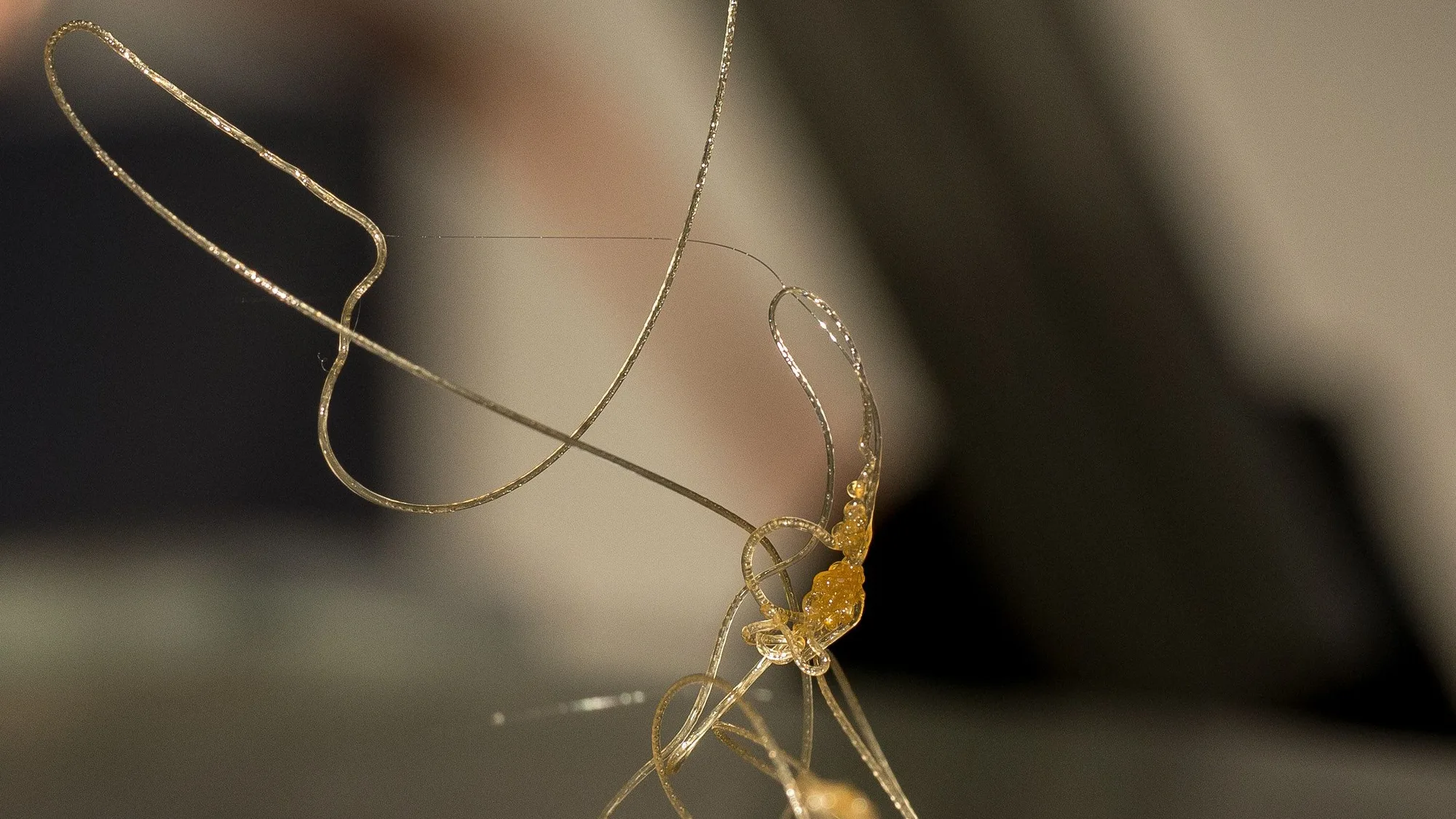
3D printer stringing is the thin plastic hairs left between separate parts of a print when molten filament leaks from the nozzle during travel moves. Prusa and Bambu Lab trace it to wet filament, a hot nozzle, weak retraction and long travel moves. Fix them in that order and test after each change.
What causes 3D printer stringing?
Stringing happens when molten plastic keeps leaking from the nozzle while the print head crosses an empty gap. Prusa says it is caused by very high printing temperatures or incorrect retraction settings, and also lists material built up in the nozzle, moisture in the filament and a hotend heat problem. Bambu Lab adds long travel distances and an oversized or worn nozzle. The table maps what you see to the usual cause.
| What you see | Likely cause | Try first | Source |
|---|---|---|---|
| Strings plus a rough, bubbly surface | Wet filament | Dry the spool | Prusa, Bambu Lab |
| Fine strings between every part | Nozzle too hot | Lower the temperature 5 to 10 °C | Prusa, Bambu Lab |
| Strings and blobs after long travel moves | Retraction length or speed too low | Raise one in small steps | Prusa, Bambu Lab |
| Strings mostly on plates with several objects | Too much travel over open air | Move parts closer, avoid crossing walls | Prusa, Bambu Lab |
| Strings after long runs of one material or a hotend change | Residue in the nozzle, a worn nozzle or a hotend heat problem | Clean or replace the nozzle, check the hotend assembly | Prusa, Bambu Lab |
| Strings on a low-density filament such as PLA Aero | Extra gas expanding in the melt | Dry it, lower the temperature, set flow ratio 0.5 to 0.7 | Bambu Lab |
Is wet filament causing your stringing?
Check this first, because wet filament makes every other adjustment unreliable. Bambu Lab explains that moisture vaporizes when heated, which makes the molten material burst and flow abnormally. Prusa says poor surface quality is usually the first sign of wet filament, followed by stringing and, in severe cases, low layer adhesion, blobs and bubbling. It suggests trying a different spool to see whether the filament is the problem.
If a second spool prints cleanly, dry the first one at the maker's temperature and time. Prusa lists 45 °C for 6 hours for PLA and 55 °C for 6 hours for PETG; the full table is in how to dry filament. To stop the problem coming back, store spools sealed with desiccant (how to store filament) or print from a heated box (how to choose a filament dryer).
How much should you lower the nozzle temperature?
Lower it by 5 to 10 °C and print again, staying inside the range printed on the spool. Prusa says lowering the temperature decreases the occurrence of strings. Bambu Lab explains why: an excessively high nozzle temperature reduces the viscosity of the molten plastic, so it flows too freely.
Change one step at a time and stop when the strings thin out. For reference, Prusa recommends 210 to 215 °C for PLA and 230 to 240 °C for PETG, and its starting points are on the PLA print temperature and PETG print temperature pages. If layers look weak after you lower the temperature, go back up a step and move on to retraction.
What retraction settings stop stringing?
Raise retraction length or speed in small steps and stop at the shortest setting that clears the strings. Retraction pulls filament back before a travel move so it cannot leak across the gap. The table collects the maker and slicer guidance; retraction settings explained covers each setting in more depth.
| Setting | What the documentation says | Source |
|---|---|---|
| Retraction length | Maximum of 2 mm on the MK2.5/S and MK3/S/+; the Bowden-fed MINI presets default to 3.2 mm. Keep it no greater than 2 mm generally, because overly long retraction can cause clogging. | Prusa, Bambu Lab |
| Retraction speed | A higher speed improves stringing, but too high can make the extruder motor skip steps. | Prusa |
| Minimum travel after retraction | The preset is 1 mm. A larger value shortens print time but increases oozing and stringing. | Prusa |
| Lift Z | A lower value improves stringing; turning it off can let the nozzle hit the print. | Prusa |
| Wipe while retracting | Prusa recommends leaving it on. OrcaSlicer describes it as moving the nozzle along the last extrusion to clean up leaked material. | Prusa, OrcaSlicer |
The right length depends on the extruder and the material. OrcaSlicer's retraction test runs from 0 to 2 mm in 0.1 mm steps, which it describes as suitable for most direct drive extruders, and suggests 1 to 6 mm in 0.2 mm steps for Bowden. Its wiki says PLA or ABS may need only 0.2 to 0.4 mm, while PETG and TPU are prone to stringing and may need more.
How do travel moves and plate layout cause stringing?
Every long move across open air gives the nozzle time to leak, so fewer and shorter travel moves mean fewer strings. Bambu Lab says a model with many separate structures, or several objects spaced far apart on one plate, forces more and longer travel moves, and the molten plastic drips down during them. Three changes help:
- Reduce the spacing between objects on the plate (Bambu Lab).
- Turn on "Avoid crossing wall" in Bambu Studio, or "Avoid crossing perimeters" in PrusaSlicer, so travel stays inside the part.
- Print objects one at a time. Prusa says sequential printing lowers the chance of strings between parts, but warns you to watch the print closely.
Could the nozzle or hotend be the problem?
Yes, if drying, temperature and retraction are already right. Prusa says a long run with one filament such as PETG can leave a thin layer inside the nozzle, so clean it thoroughly before printing and use the factory preset settings. It also lists a hotend heat dissipation problem, including parts missing or misplaced after a hotend change. Bambu Lab says a nozzle wider than the slicer profile assumes pushes out too much plastic, and a nozzle with obvious wear should be replaced.
Make sure the nozzle size set in the slicer matches the real one (see 3D printer nozzle sizes), and follow the steps in how to clean a 3D printer nozzle if you suspect residue.
Does the material change how you fix stringing?
Yes: some materials string far more than PLA, and the settings that work differ. Prusa lists a possibility of stringing among the drawbacks of PETG, and the PETG stringing guide applies the same steps with PETG numbers from Prusa and Bambu Lab. Prusa describes flexible filaments as a special case that can need a lot of tweaking and tuning, which the what is TPU page covers. Low-density filaments such as PLA Aero have their own rules in Bambu Lab's guide: dry them, lower the print temperature and set the flow ratio between 0.5 and 0.7.
How do you test that the stringing is fixed?
Print the same small test after each change and compare it with the last one. OrcaSlicer's retraction test prints a tower with a different retraction length at each notch, and its wiki says the optimal length is the shortest one that produces the cleanest tower. Change one setting, print, compare, and keep a note of what worked for each material.
How do you remove strings from a finished print?
Prusa suggests a heat gun at about 200 °C aimed at the strings for one or two seconds. A lighter also works but needs great care. Do not hold the heat on the model longer than that or the part may deform. Preventing the strings with the steps above is quicker and neater. For other print defects, see 3D printer problems and fixes.
Research-based guide. This page is compiled from maker and slicer documentation and has not been checked on a test printer. Treat every number as a starting point and change one setting at a time.
Frequently asked questions
Why does my 3D printer string even with retraction turned on?
Retraction only helps if the plastic is not leaking for another reason. The usual causes are filament that has absorbed moisture, a nozzle temperature that is too high for the material, and a retraction length or speed that is too low for the length of the travel move. Bambu Lab also lists many separate structures or wide spacing on one plate, and a nozzle that is worn or larger than the slicer profile assumes. Work through them in order: dry the spool, lower the nozzle temperature by 5 to 10 °C, raise retraction length or speed in small steps, shorten travel moves, then check the nozzle. Change one setting at a time so you can tell which change helped.
What retraction distance should I use to stop stringing?
There is no single value, because it depends on the extruder and the material. Prusa says retraction length should be 2 mm or less on its MK2.5/S and MK3/S/+ printers, while the Bowden-fed MINI presets default to 3.2 mm. Bambu Lab recommends keeping retraction length no greater than 2 mm because very long retraction can cause clogging. OrcaSlicer's retraction test runs from 0 to 2 mm in 0.1 mm steps for most direct drive extruders and suggests 1 to 6 mm for Bowden. Its wiki says the best length is the shortest one that gives the cleanest tower, and that PLA or ABS may need only 0.2 to 0.4 mm.
Does nozzle temperature affect stringing?
Yes. Prusa says lowering the temperature decreases the occurrence of strings and suggests trying 5 to 10 °C lower. Bambu Lab explains that an excessively high nozzle temperature reduces the viscosity of the molten material, which leads to abnormal extrusion. Stay inside the range printed on your spool, change the temperature in small steps and print the same test each time. For reference, Prusa recommends 210 to 215 °C for PLA and 230 to 240 °C for PETG. If layers look weak or thin after you lower the temperature, go back up one step and tune retraction and travel moves instead of cooling the nozzle further.
How do I remove strings from a finished print?
Prusa suggests a heat gun set to about 200 °C, held on the strings for one or two seconds. The article also mentions a lighter but says to be very careful with it. Do not hold the heat source on the model for longer than a second or two, because the part may deform, and follow the tool maker's safety guidance. Cleaning up is only a stopgap: the strings will come back on the next print unless you fix the cause, which is usually wet filament, a hot nozzle, weak retraction or too much travel over open air. Work through the checklist above to stop them at the source.
Sources

Founder and editor
Software engineer since 2009 and Head of Engineering by day, a maker who has owned several 3D printers, writing practical guides to 3D printers, filament and running costs, with every article saying what was and was not tested.
Drafted with AI assistance, then edited and reviewed by Sepehr before it goes live. How we use AI.
Keep reading
 AI illustration
3D Printer Problems and Fixes: A Troubleshooting Guide
A symptom-first guide to common 3D printer problems: what causes them and what to try first, based on manufacturer…
 AI illustration
How to Stop PETG Stringing
PETG is prone to stringing. Fix it in this order: dry the spool, lower the nozzle temperature, tune retraction, shorten travel…
 AI illustration
Heat Creep 3D Printer Jams: Causes and Fixes
What heat creep is, how to tell it from an ordinary clog, and the cooling, enclosure and settings fixes Prusa's documentation…